
How to make YouTube safe for kids
YouTube has great songs, lessons and stories for children, but the next video is chosen by an algorithm, not by you. One autoplay can lead from a counting song to a scary clip, a prank or a fast "brainrot" meme.
COONI puts a parent in charge of that next video. Videos still come from YouTube and play in the official YouTube player, but your child only sees what passes your rules. These steps take about five minutes.
Step by step
Create a free parent account
Open cooni.online and sign up with your Gmail address. Only you need an account; COONI never asks for your child’s name, age or photo. Then choose a 4-digit Parent PIN.
Allow only the channels you trust
In Parent Mode → Channels, choose "Only channels I allow" and add the channels you trust, from the suggested kids’ channels or by searching. Channels you have not allowed never appear.
Check the blocked topics
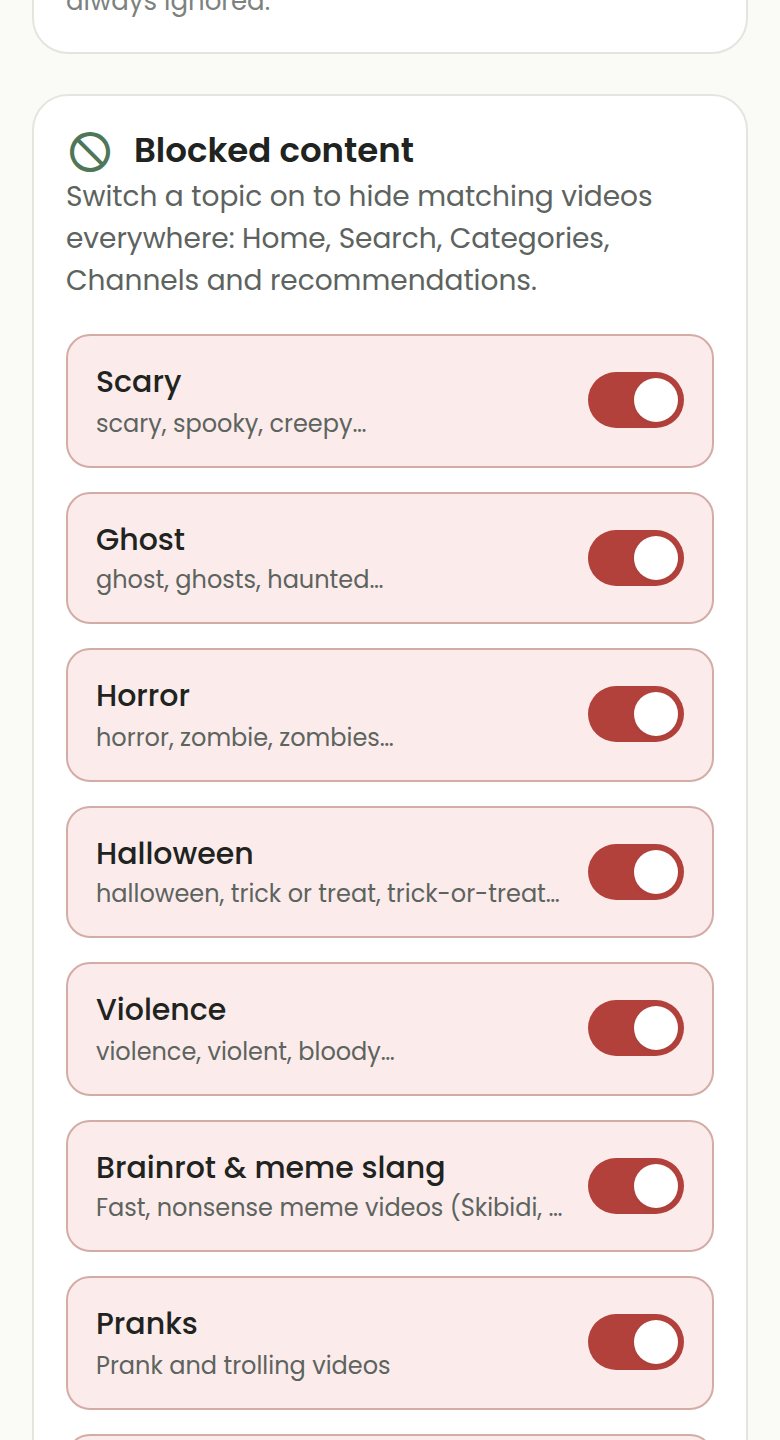
In Parent Mode → Content, the topics under "Blocked content" (Scary, Horror, Halloween, Pranks, Dangerous challenges, Brainrot & meme slang and more) hide matching videos everywhere, even inside allowed channels.
Keep Shorts out of the way
The "Short clips (under 1 minute)" rule is on by default, so most Shorts are hidden, and the rest stay in their own row and never play by themselves.
Set a daily limit
In Parent Mode → Viewing, turn on "Limit viewing time each day". When the time is used up, your child sees a friendly "Time for a break!" screen.
Give your child the device
Child Mode opens by itself. To change anything, tap Parent and enter your PIN, so your child cannot undo your rules.
Questions
Can any app make YouTube 100% safe?
No. COONI reads the title, description, tags, length and YouTube’s Made for Kids label, so it can miss a video or hide a good one. "Only channels I allow" is the strongest setting, and you can block or allow any single video yourself.
Does it work on iPad, iPhone and Android?
Yes. Open cooni.online in Safari or Chrome and add it to the home screen. It also works on computers.
Is it free?
Yes. Allowed and blocked channels, hiding single videos, the built-in topics, the Shorts rule and the daily limit are free. COONI Plus adds extra parent tools, such as your own blocked words and allowed viewing hours.
Try COONI free · How to use COONI
More guides
- How to block a YouTube channel for kids: Block a YouTube channel so your child never sees its videos, or allow only the channels you trust. Step-by-step with COONI, free.
- How to block certain YouTube videos without blocking the channel: A good kids’ channel can still have one video you would rather skip. Hide just that video and keep the rest of the channel. Free with COONI.
- How to block brainrot on YouTube for kids: Hide fast, nonsense "brainrot" meme videos, scary Halloween clips and pranks on YouTube for your child. Step-by-step with COONI.
- How to hide YouTube Shorts for kids: Stop your child watching endless YouTube Shorts. COONI hides short clips by default, keeps Shorts apart and never plays them automatically.
- A YouTube Kids alternative where parents choose the channels: Looking for a safer YouTube Kids alternative? COONI lets parents pick the channels, hide single videos, block brainrot and set screen time. Free.
- How to set YouTube screen time for kids: Set a daily YouTube time limit for your child, show a countdown timer and end with a friendly "Time for a break!" screen. Step-by-step with COONI.
- How to block all YouTube channels except the ones you choose: Let your child watch only the YouTube channels you pick and block every other channel. "Only channels I allow" in COONI, free, step by step.
- How to stop your child watching inappropriate videos on YouTube: Your child found a video you do not like? Block the channel, hide the single video or block the whole topic, step by step with COONI.
- How to see what your child watches on YouTube: See the videos your child watched recently and how long they watched today, then block anything you do not like. Step by step with COONI.
COONI is not affiliated with or endorsed by YouTube or Google.